Pandas vs Excel vs DataOlllo for Large Dataset Analysis on Windows
5/30/2026
The Problem
Every day, analysts across healthcare, finance, government, and legal industries download sensitive datasets — patient records, financial transactions, citizen records, case files — and face a choice: process it in a spreadsheet (which struggles with size) or upload it to a cloud AI tool (which creates data exposure risk).
For most serious data work, spreadsheets are inadequate for large datasets. Cloud AI tools are adequate for analysis but inadequate for sensitive data. Analysts end up spending hours manually filtering in Excel, writing inefficient Python scripts, or simply working with incomplete subsets of data to avoid the problem.
The result is slower decisions, less thorough analysis, and unnecessary risk.
Why This Happens
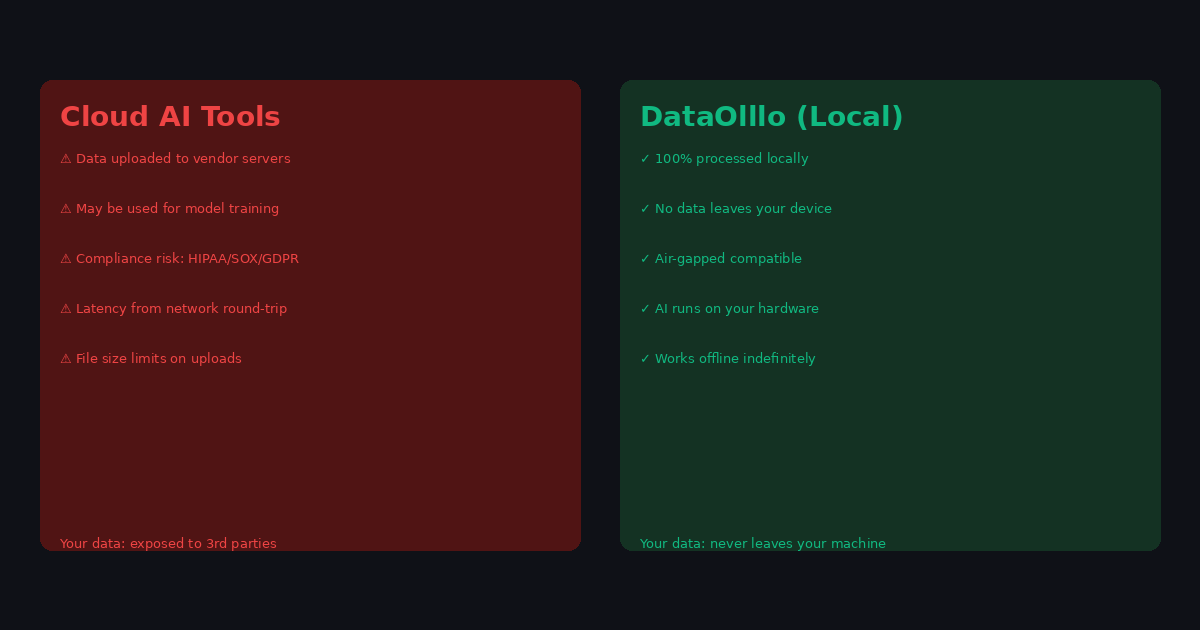
Cloud-based AI and analytics platforms are designed for convenience, not for data sovereignty. When you upload a CSV to a SaaS AI tool, your data travels to their servers, may be stored temporarily for processing, and could potentially be used for model training depending on their terms of service.
For healthcare data protected under HIPAA, financial data covered by SOX compliance, or government data subject to FedRAMP or equivalent frameworks, this data movement creates real legal and regulatory exposure. Even when platforms claim compliance, the liability is real.
Spreadsheets like Excel were built before these concerns were well understood. They handle small data well but fail on large datasets. There's been no good option for "large data processing with full local privacy" — until local-first desktop applications became viable.
Step-by-Step Workflow
-
Download your sensitive dataset from your internal system. Keep it entirely within your organization's network.
-
Transfer to an air-gapped workstation if your security policy requires it — DataOlllo runs fully offline with no network connectivity required.
-
Open the file in DataOlllo — the desktop app processes everything locally. No bytes are sent to any server.
-
Perform your analysis — filter, group, merge, clean, and explore using DataOlllo's no-code interface.
-
Use AI Chat to ask analytical questions in plain English. The AI model runs locally on your machine, not in the cloud.
-
Export results — save cleaned datasets, summaries, and reports locally. Your original source data remains where it was.
Automating This with Directory Mode
Sensitive organizations often have recurring data feeds that require the same processing every time. Directory Mode supports this workflow entirely offline:
- Organize sensitive data feeds on a local file server or air-gapped workstation
- Point DataOlllo at the folder containing the recurring exports
- Apply the same transformation and filtering logic each period
- Export results to a designated output location
The entire workflow happens with zero network activity. DataOlllo's Directory Mode processes files from disk and writes results to disk, never touching the internet.
When DataOlllo Is the Right Tool
DataOlllo's local processing model was designed specifically for this compliance-constrained workflow.
Relevant capabilities:
- 100% local processing — no cloud, no data leaves your environment, air-gapped compatible
- Large CSV handling — process multi-GB datasets that crash cloud upload tools or exceed their size limits
- Local AI — AI-assisted analysis runs entirely on your machine, no data sent to external AI providers
- HIPAA and compliance-ready — data never crosses organizational boundaries, eliminating third-party risk
Spreadsheet tools and cloud AI tools both create problems for sensitive data. DataOlllo eliminates both by design: local processing for data sovereignty, no-code interface for accessibility, large data handling for real-world dataset sizes.
Get Started
Visit the Privacy Compliance solution page for more on how DataOlllo handles sensitive data.