Shopify Sales Workflow in 3 Minutes: Clean, Analyze and Automate Reports
5/25/2026
Problem
Multi-channel sellers work with order data from Shopify, Amazon, WooCommerce, eBay, and TikTok Shop. Each platform has its own export format: different column names, different date formats, different ways of representing the same information.
A typical operational nightmare looks like this: you want a unified view of all orders from last month to calculate total revenue by product. You download January CSVs from three platforms, open them in traditional spreadsheets, try to standardize the date column (MM/DD/YYYY vs DD/MM/YYYY vs ISO), match the SKU column (Platform-SKU-001 vs SKU-001), and copy-paste everything into a master spreadsheet. By the time you're done, an hour has passed and you've made at least one copy-paste error.
Why It Happens
Every e-commerce platform optimizes its CSV export for its own internal use — not for cross-platform consolidation. Column names differ: "Lineitem sku" vs "SKU" vs "Item-ID." Date formats differ: Amazon uses its own convention, Shopify uses ISO, your fulfillment system uses something else entirely. Currency columns might show "$1,234.56" from one platform and "1234.56 USD" from another.
VLOOKUP formulas in traditional spreadsheets might help with matching, but they're fragile — if your SKU list changes even slightly, the formula breaks. And traditional spreadsheets's handling of inconsistent date formats is notorious: it might interpret "03/12/2023" as March 12 or December 3 depending on your system locale, silently corrupting your data.
Practical Workflow
-
Export order CSVs from each platform: Shopify Admin > Reports > Export > All Orders, Amazon Seller Central > Orders > Download Reports, and similar for your other channels.
-
Place all CSVs in one folder — keep it simple, one folder per reconciliation period (e.g., "Jan2026_Orders").
-
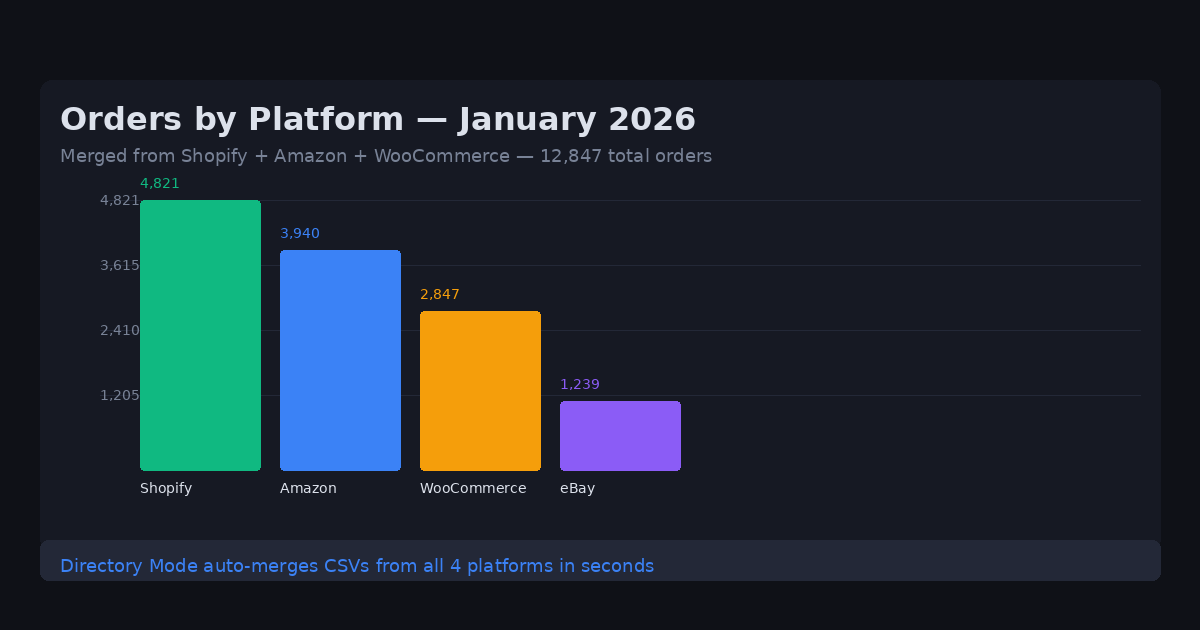
Open DataOlllo and use Directory Mode — select the folder. DataOlllo reads all files, auto-detects column differences, and aligns columns intelligently even when column names and order vary between platforms.
-
Normalize currencies and dates — use DataOlllo's built-in normalization to convert all dates to a single standard format and strip currency symbols for numeric processing.
-
Merge by SKU — if you need to join order data with a product catalog, use the key-matching feature to join on SKU without writing VLOOKUP formulas.
-
Calculate total revenue — use the group-by panel to sum revenue by SKU, by platform, or by date period.
-
Export the unified report — save as CSV or traditional spreadsheets for your accounting team or BI tool.
Directory Mode Instructions
Directory Mode is specifically designed for recurring multi-file workflows. After you've merged January's files, save the workflow as a reusable template:
- Create a folder for each month's exports
- Drop new monthly CSVs into the folder
- Open in DataOlllo > Directory Mode > Apply the same column normalizations
- Export the unified report
This turns a 60-minute manual process into a 2-minute automated one. The key efficiency gain is auto column alignment — you don't need to manually rename "Lineitem sku" to "SKU" across 12 different files before you can merge them.
Common E-commerce Platform Column Names
| Platform | Order ID | Date | SKU | Amount |
|---|---|---|---|---|
| Shopify | Order# | Created at | Lineitem sku | Total price |
| Amazon | Amazon Order ID | Order Date | ASIN | Item Total |
| WooCommerce | Order | Date Created | SKU | Order Total |
| eBay | Transaction ID | Sale Date | Item SKU | Sale Price |
DataOlllo's auto column alignment maps these different column names to a unified schema automatically.
When to Use DataOlllo
Multi-channel e-commerce reporting is one of the clearest use cases for DataOlllo's local processing model.
Relevant capabilities:
- Directory Mode — merges multiple CSV files from different platforms automatically
- Auto column alignment — intelligently matches columns even when names and order differ
- Datetime and currency normalization — converts inconsistent formats to a single standard
- Large CSV handling — merge files with 500,000+ combined rows without traditional spreadsheets crashes
Spreadsheets fail this workflow because they're built for single-file editing, not multi-file consolidation. DataOlllo's Directory Mode treats your folder as a database table.
Next Step
Visit the E-commerce solution page for more specific workflows.