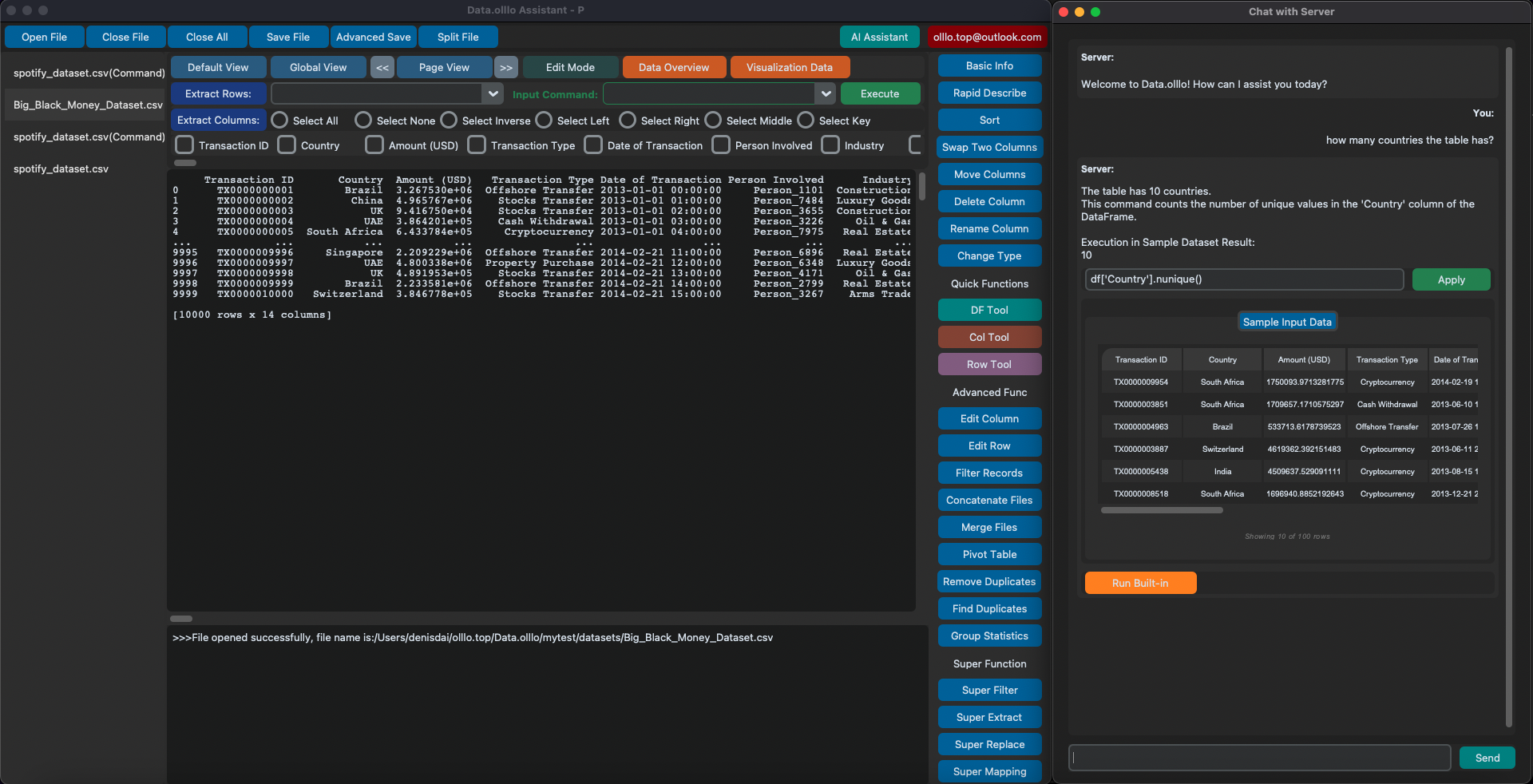
DataOlllo is a desktop application for preparing and analyzing local data files. Open CSV data, select the rows and columns you need, split or merge files, and save repeatable workflows without writing code.
It lets you open large CSV files locally, explore, clean, and analyze your data, then save and repeat your workflow. File capacity depends on your computer, the dataset, and the operation you run.
DataOlllo brings together no-code operations, AI intelligence, and workflow automation into one seamless experience.
What DataOlllo Lets You Do
1. Start with No-Code, Button-Click Operations
Use an intuitive interface to work with your data instantly:
- Clean and transform columns
- Sort, filter, and group
- Merge datasets
- Create charts and summaries
- Navigate huge datasets smoothly with a large CSV viewer
Everything works locally, with zero coding required.
For a quick check before starting a desktop workflow, use the free CSV tools to count rows, detect delimiters, or split a browser-compatible file.
2. Use AI to Analyze and Understand Your Data
When you need deeper insights, the built-in AI assistant is ready:
- Ask questions about your dataset
- Generate charts or visualizations automatically
- Detect patterns, trends, and anomalies
- Summarize tables or segments
- Get guidance on what to explore next
You choose the AI source: built-in, ChatGPT, Gemini, Claude, or local Ollama models.
Core file operations run locally. Optional cloud AI features can send prompts and supplied context to the selected provider; check the provider and the information you include before using them with sensitive data.
3. Turn All Your Steps Into a Reusable Workflow
Everything you do — whether button clicks or AI-generated steps — can be recorded:
- Capture your entire transformation process
- Reuse it for similar datasets
- Run it with one click
- Edit, reorder, and optimize steps
- Mix manual and AI-generated actions seamlessly
This becomes your automated pipeline for recurring reports, cleaning tasks, and batch processing.
Why DataOlllo Is Different
⚡ Fast & Powerful
Choose a preview, select relevant columns, or split a source file before working with more data. These approaches help keep a task manageable; processing time and memory use depend on the file and operation.
🔒 Local-First Privacy
Use local file operations to prepare data on your computer. Optional cloud AI has different data-sharing implications from local processing; review the privacy policy before handling sensitive information.
🖱️ No-Code, Button-Click Simplicity
You don’t need to write any code. Cleaning, filtering, joining, transforming, and visualizing your data can all be done through simple buttons and clear controls.
🤖 Integrated AI
The optional AI assistant helps you request operations in natural language. Review generated steps and results before relying on them. Available providers include cloud services and local Ollama; choose the provider that fits your data-handling requirements.
🔁 End-to-End Automation
Every action you take can be saved as part of a workflow. Reuse it anytime to instantly repeat your entire process with one click.
For a first task, follow the getting started guide, learn to filter a large CSV file, or build your first reusable workflow. Download DataOlllo to try the desktop application.