Append vs Join for Multi-Branch Inventory CSV Files: Which Workflow Fits the Report?
6/20/2026
Append vs Join for Multi-Branch Inventory CSV Files: Which Workflow Fits the Report?
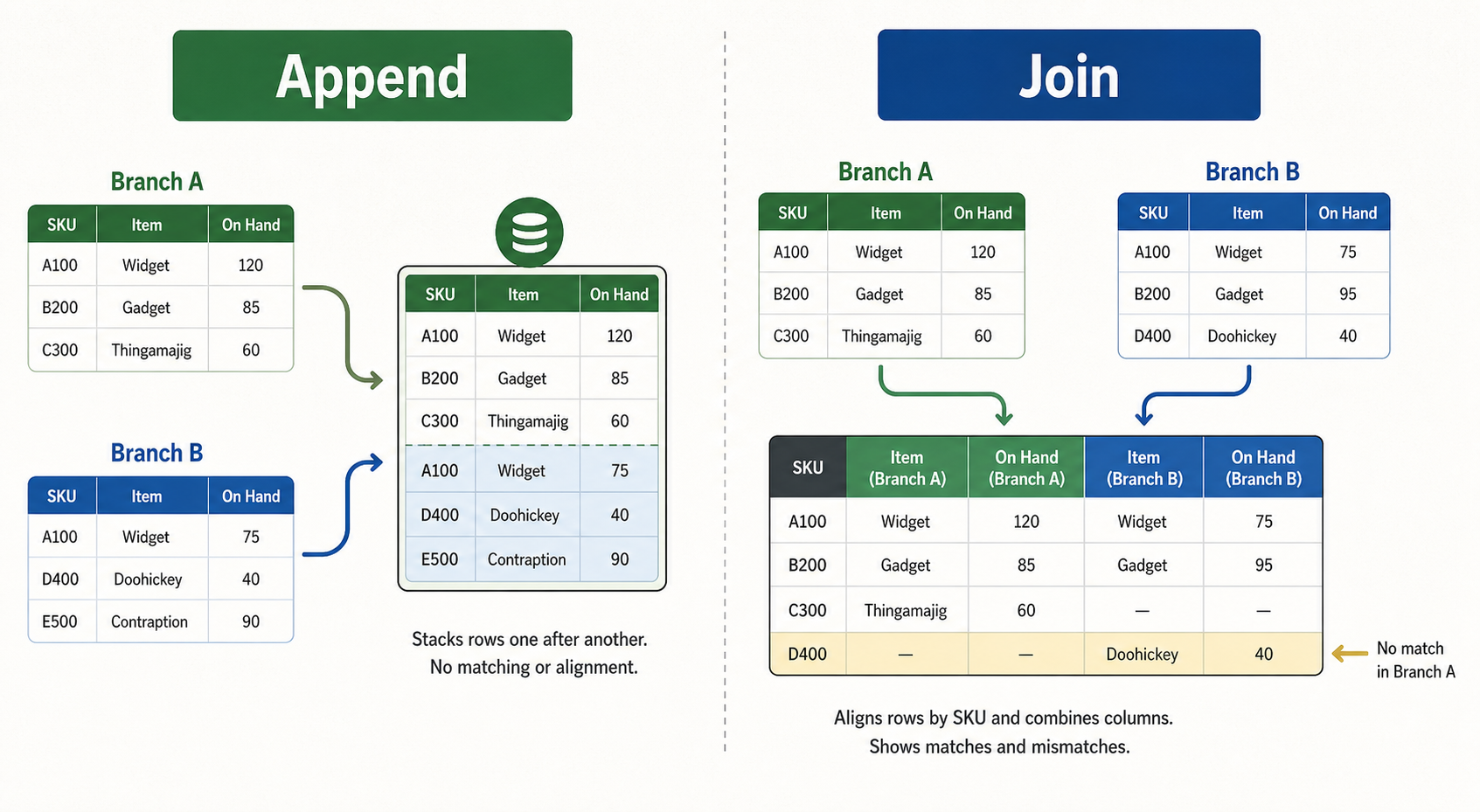
Teams that work with branch inventory exports often hit the same decision early in the process: should these files be appended into one long table, or joined side by side into one wider comparison view? Choosing the wrong workflow creates confusion before the real analysis even starts.
DataOlllo helps operations teams test both paths locally so the working file matches the question the report actually needs to answer.
The Short Version
| If your question is... | Better workflow |
|---|---|
| What happened across all branches this week? | Append |
| How does Branch A compare with Branch B on the same SKU list? | Join |
| Do I need one unified transaction history? | Append |
| Do I need side-by-side column comparison? | Join |
The difference is not technical jargon. It changes the shape of the review file and what you can reliably spot.
What Append Does Well
Appending stacks files with the same structure on top of each other.
It works best when:
- Every branch export has the same columns.
- You want one combined movement or stock history.
- The team needs totals, trends, or branch-level grouping later.
Example Append Use Case
| Branch | SKU | On-hand units | Snapshot date |
|---|---|---|---|
| East | A-104 | 38 | 2026-06-20 |
| West | A-104 | 27 | 2026-06-20 |
| North | A-104 | 41 | 2026-06-20 |
This shape is good for totals, trends, and branch ranking.
What Join Does Well
Joining matches rows from one file to another using a shared key such as sku, branch_sku, or item_id.
It works best when:
- You need side-by-side comparison across branches.
- The report is focused on mismatches, gaps, or exceptions.
- One file contains reference data and the other contains current stock values.
Example Join Use Case
| SKU | East on-hand | West on-hand | Difference | Review note |
|---|---|---|---|---|
| A-104 | 38 | 27 | 11 | Check replenishment balance |
| B-220 | 12 | 12 | 0 | No action |
| C-811 | 4 | 19 | -15 | Investigate transfer timing |
This shape is better for exception review and direct comparison.
A Decision Table for Multi-Branch Reports
| Report goal | Recommended workflow | Why |
|---|---|---|
| Build one total inventory view | Append | Preserves one row per branch snapshot |
| Compare stock by branch for the same SKU | Join | Puts branch values side by side |
| Analyze transfers over time | Append | Easier to group by date and branch |
| Find branch mismatch exceptions | Join | Easier to calculate gaps |
Text Chart: Workflow Fit by Question
Inventory reporting choices

Unified history need       ██████████ append
Cross-branch comparison    ██████████ join
Trend reporting            ████████░░ append
Mismatch review            █████████░ join
Common Mistakes
- Appending files that do not actually share the same columns.
- Joining files without first cleaning the shared SKU key.
- Expecting a joined table to work well for time-series trend analysis.
- Keeping duplicate SKUs in the reference file and then treating the join output as clean.
A Simple Workflow Before You Decide
- Confirm whether the branch exports share the same structure.
- Identify the real report question: trend, total, or side-by-side comparison.
- Clean the shared keys before joining.
- Test the output shape with a small sample.
- Keep unmatched rows visible so missing SKUs are not silently lost.
When This Guide Helps Most
Use it when branch managers, inventory analysts, or supply planners are all pulling files from different systems and the combined report keeps changing shape. Picking the right merge method early reduces rework and makes the downstream review clearer.
Next Step
If your inventory file keeps becoming harder to read every week, start by choosing the output shape that matches the business question before merging everything together. You can download DataOlllo here: https://www.dataolllo.com/download