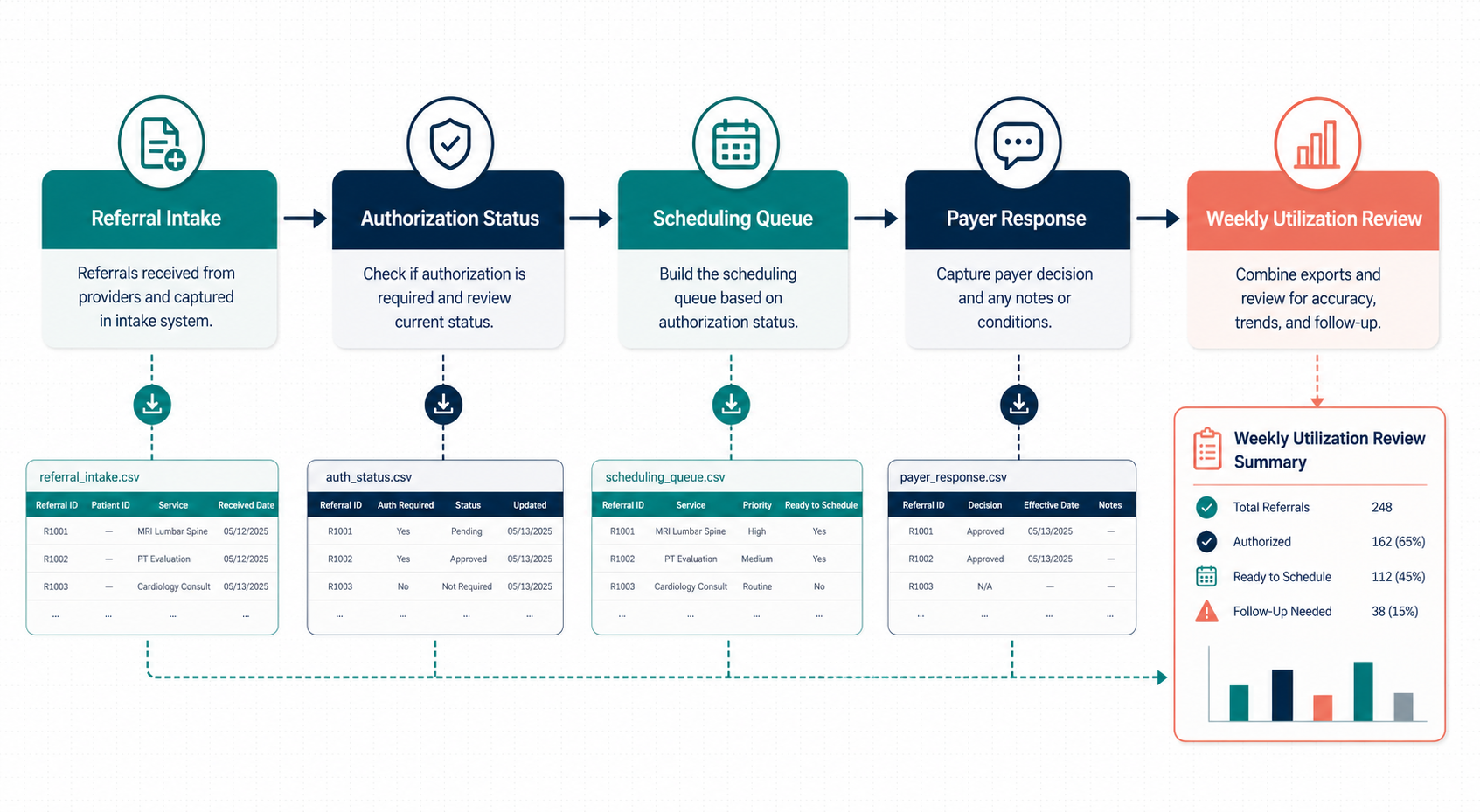
Combine Referral Authorization CSV Exports Before a Weekly Utilization Review
6/20/2026
Combine Referral Authorization CSV Exports Before a Weekly Utilization Review
Weekly utilization reviews often sound straightforward: count pending authorizations, find aging requests, and surface the cases that need payer follow-up. In practice, the work is usually spread across referral exports, scheduling queues, status logs, and payer response files that do not line up cleanly.
DataOlllo gives healthcare operations teams a local workflow for merging those CSV exports and preparing a cleaner review file without pushing patient-sensitive data into extra systems.
Where the Review Usually Breaks
| Export | Common issue | Operational effect |
|---|---|---|
| Referral intake file | Ordering provider and clinic names vary | Volumes split across nearly identical labels |
| Authorization status log | Status codes change by payer or staff habit | Pending counts become unreliable |
| Scheduling file | Appointment dates are not tied back to referral IDs consistently | Urgent cases are missed |
| Payer response export | Decision timestamps arrive late or in a separate file | Aging review becomes manual |
The risk is not only inefficiency. An unclear queue can also make follow-up work inconsistent across coordinators.
A Weekly Utilization Workflow
- Open the referral intake, authorization status, scheduling, and payer response exports locally.
- Standardize columns such as
referral_id,patient_account,service_line,ordering_provider,payer,auth_status,scheduled_date, anddays_open. - Normalize status labels into clear buckets such as pending, approved, denied, missing information, and expired.
- Join scheduled appointments back to the authorization queue to flag time-sensitive cases.
- Filter by service line, payer, age bucket, and missing-document status.
- Export one coordinator worklist and one management summary.
This gives the review a usable queue instead of several disconnected lists.
Example Utilization Review Table
| Service line | Pending authorizations | Over 5 days open | Scheduled within 3 days | Primary action |
|---|---|---|---|---|
| Imaging | 42 | 16 | 11 | Escalate payer follow-up |
| Therapy | 27 | 8 | 6 | Check missing documentation |
| Cardiology | 18 | 5 | 4 | Review denial reasons |
| Infusion | 13 | 7 | 3 | Prioritize high-cost cases |
Useful Status Buckets
| Status bucket | What belongs here |
|---|---|
| Pending payer review | Submitted but no final response yet |
| Missing information | Notes indicate documentation or order gap |
| Approved not scheduled | Authorization is ready but patient is not yet booked |
| Scheduled without clean authorization | Highest near-term operational risk |
| Denied or expired | Needs rework, appeal, or restart |
Text Chart: Queue Pressure
Authorization queue focus

Pending payer review      ██████████
Missing information       ███████░░░
Scheduled at risk         ██████░░░░
Denied or expired         █████░░░░░
Approved not scheduled    ████░░░░░░
Common Mistakes
- Treating every pending record the same instead of sorting by appointment urgency.
- Leaving payer-specific status labels ungrouped.
- Reviewing utilization only by total volume, without showing the aging buckets.
- Keeping missing-document records mixed into genuine payer delays.
A Small Audit Table for the Coordinator Lead
| Question | Why ask it |
|---|---|
| Which payer has the largest over-5-day queue? | Helps direct follow-up effort |
| Which service line has scheduled patients waiting on approval? | Surfaces near-term risk |
| How many cases are blocked by internal documentation gaps? | Separates payer delay from intake cleanup |
| Which coordinators own the oldest open records? | Supports balanced workload review |
When This Workflow Helps Most
Use this approach when referrals move through several teams, when multiple payers use different status language, or when the review meeting needs more than a total pending count. A structured local file lets the team answer operational questions faster and with less backtracking.
Next Step
If weekly authorization review still starts with four exports and a lot of manual filtering, build one local working file first and review the queue from there. You can download DataOlllo here: https://www.dataolllo.com/download