Generate Audit-Ready Financial Reports from Large CSV Exports in Minutes
5/28/2026
The Problem
Annual audits require pulling financial data from multiple source systems: the ERP's general ledger export, the payroll system's CSV, the CRM's billing report, and the bank statement. Each has hundreds of thousands of rows and hundreds of columns.
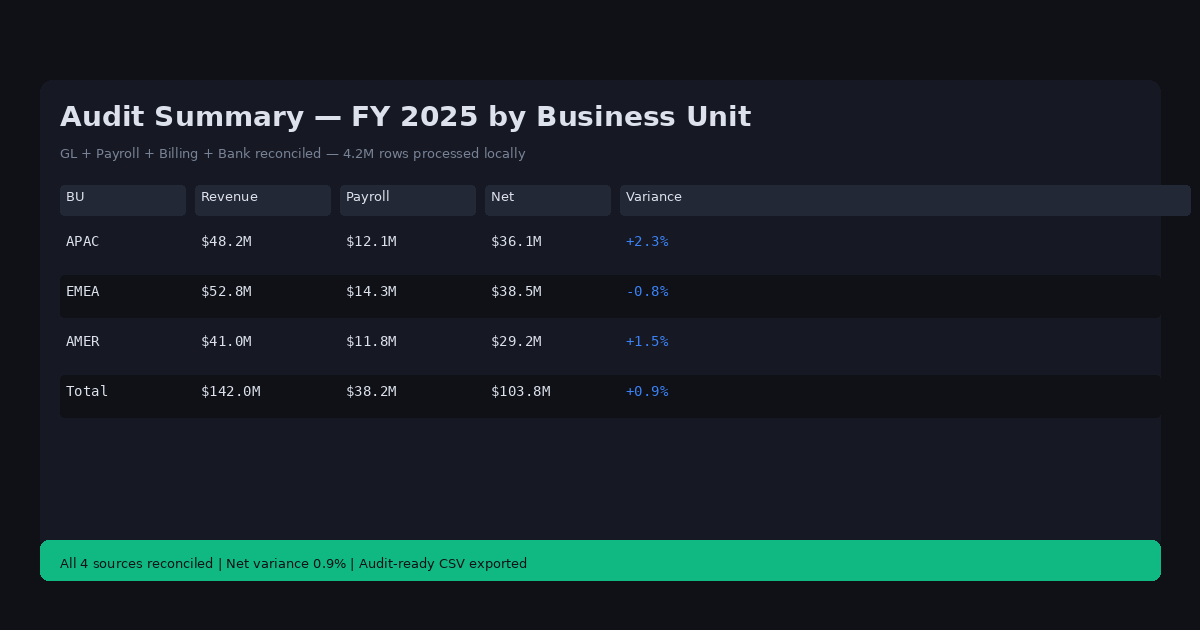
The audit team needs a clean summary: total revenue by business unit, headcount by department, total discretionary spend, and a list of transactions over $10,000 for the past fiscal year.
Doing this in Excel means building a separate pivot table for each view, carefully linking them with formulas, and running into performance issues when the underlying data exceeds a certain size. By the time the summary is ready, the data may have already changed in the source systems.
Why This Happens
Financial audit data is large and multi-dimensional. A single year's GL export from an ERP system can contain 2-5 million rows (one per journal entry). Payroll exports include salary, benefits, and tax withholding columns. Bank statements include every transaction with counterparty details.
Building audit reports in Excel requires aggregating millions of rows across multiple dimensions — which is exactly where pivot tables break down. The alternative (Python or SQL) requires coding knowledge and database setup.
Cloud BI tools can handle the volume but require uploading potentially sensitive financial data (PII, executive compensation, M&A activity) to third-party platforms.
Step-by-Step Workflow
-
Export financial CSVs from each source system for the audit period: GL, payroll, billing, bank statements. Save to a local audit folder.
-
Open the folder in DataOlllo using Directory Mode — combines all source files, auto-aligns columns, and tracks source file for each row.
-
Filter the date range to the audit period (e.g., fiscal year 2025).
-
Apply the audit filters — transactions over $10,000, specific cost center codes, particular account types.
-
Aggregate across dimensions:
- Total revenue by business unit (group by BU, sum revenue)
- Headcount by department (group by dept, count employees)
- Total discretionary spend (filter category = "Discretionary", sum amount)
-
Export clean summary tables for the audit workpapers.
Automating This with Directory Mode
Annual and quarterly audits follow the same pattern every year. Directory Mode makes this repeatable:
- Create an audit year folder: "Audit/2025_FY/"
- Each quarter, add new source exports to the folder
- Open in Directory Mode, apply the same filters and aggregations
- Export the updated summary
The aggregation logic (group by business unit, filter by amount threshold) is the same each period -- only the source data changes.
Common GL Audit Fields and Thresholds
| Field Type | Common Columns | Audit Threshold |
|---|---|---|
| Amount | Amount, Debit, Credit | > $10,000 flagged |
| Date | Trans_Date, Post_Date | Current FY |
| Account | GL_Acct, Account_Type | Revenue/Expense |
| Entity | BU, Cost_Center | Segment-level |
| Status | Approved, Posted | Unapproved flagged |
DataOlllo's filter panel lets you define multiple threshold rules simultaneously -- e.g., "amount > $10,000 AND status != Approved."
When DataOlllo Is the Right Tool
Financial audit reporting combines large datasets, complex aggregation, and high privacy requirements -- exactly DataOlllo's target use case.
Relevant capabilities:
- Large CSV handling -- process millions of GL rows without the performance issues that make pivot tables unusable
- Local processing -- financial data (executive compensation, M&A activity, detailed transactions) never leaves your environment
- Multi-file aggregation -- combine GL, payroll, billing, and bank data in one operation
- Audit-ready exports -- generate clean CSV summaries suitable for audit workpaper attachment
Spreadsheets are the standard tool for audit reporting but were not designed for datasets this large. DataOlllo bridges the gap between the audit team's analytical needs and the actual size of financial data.
Get Started
See the Finance solution page for more financial reporting and reconciliation workflows.