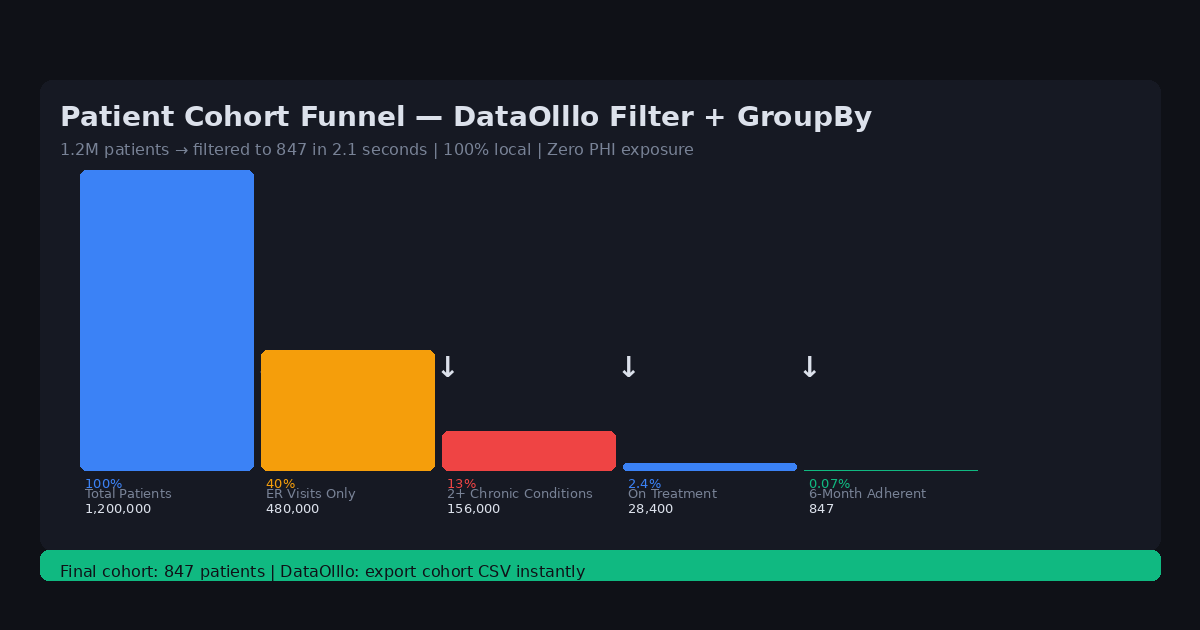
How to Perform Patient Cohort Analysis on Large Medical Datasets Locally
5/28/2026
The Problem
Healthcare analysts are frequently asked to define and analyze patient cohorts: patients with a specific diagnosis, a particular treatment history, or a defined set of lab values. The request usually comes from clinicians, researchers, or quality improvement teams who need the answer quickly.
The challenge is that cohort definitions are complex. A cohort might include patients who: were admitted to the cardiology ward in the past 12 months, had a primary diagnosis of heart failure (ICD-10 code starting with "I50"), were readmitted within 30 days, and had a left ventricular ejection fraction below 40%.
Building this cohort manually in Excel means applying nested filters, sorting through hundreds of thousands of rows, and cross-referencing multiple columns — all while being careful not to accidentally export PHI or leave the file on a shared drive.
Why This Happens
Clinical data is structured and standardized (ICD-10 codes, CPT codes, LOINC labs), but the datasets are large and the filters are complex. A typical EMR export for a mid-sized hospital system can contain 500,000+ rows and 200+ columns.
Excel's multi-condition filtering is adequate for simple cases but becomes error-prone when you need complex AND/OR logic across many columns. The risk of accidentally including or excluding the wrong patients — without realizing it — is significant in clinical contexts.
Cloud analytics tools can handle the complexity but require uploading patient data, creating HIPAA exposure.
Step-by-Step Workflow
-
Export your EMR dataset for the patient population you're analyzing. Save it locally to a secure location.
-
Open in DataOlllo — load the full dataset without filtering to a subset first.
-
Apply cohort filters using the filter panel:
- Department equals "Cardiology"
- Primary Diagnosis starts with "I50"
- Readmission 30-day flag equals "Yes"
- LVEF less than 40
-
Combine with AI Chat — ask: "Show me all patients meeting the heart failure cohort criteria, grouped by readmission status, with average length of stay for each group"
-
Export the cohort — save the filtered cohort as a new CSV for the requesting clinician or quality team.
-
Document the cohort definition — record the filter criteria used so the analysis is reproducible.
Automating This with Directory Mode
Quality improvement programs often require the same cohort analysis on a recurring schedule (monthly readmission reports, quarterly sepsis screening). Directory Mode automates this:
- Save your cohort filter criteria as a named view
- Each month, export the updated EMR data to the same folder
- Open in Directory Mode > apply the saved cohort definition
- Export the updated cohort report
The filter logic is preserved and reusable, so analysts don't need to rebuild complex cohort definitions from scratch each reporting period.
Common ICD-10 Code Prefixes for Cohort Definitions
| Code Prefix | Category | Example Diagnoses |
|---|---|---|
| I50 | Heart Failure | I50.9, I50.1, I50.2 |
| E11 | Type 2 Diabetes | E11.9, E11.6, E11.4 |
| I10 | Hypertension | I10, I11.9 |
| J44 | COPD | J44.0, J44.9 |
| N18 | CKD | N18.3, N18.4, N18.5 |
| I21 | Acute MI | I21.0, I21.1, I21.3 |
Use DataOlllo's "starts with" filter on diagnosis codes to capture entire disease categories in one click.
When DataOlllo Is the Right Tool
Healthcare cohort analysis is an ideal use case for DataOlllo's local processing model.
Relevant capabilities:
- Local processing — PHI never leaves your workstation, HIPAA compliant by design
- Complex filtering — multiple AND/OR conditions across many columns without formula complexity
- Large EMR datasets — handle 500,000+ row exports from Epic, Cerner, and other EHR systems
- No-code interface — clinical staff without technical backgrounds can build and run cohort queries
The combination of complex multi-condition filtering and local-only processing makes DataOlllo particularly well-suited for healthcare analytics workflows.
Get Started
Visit the Healthcare solution page for more healthcare data workflows.