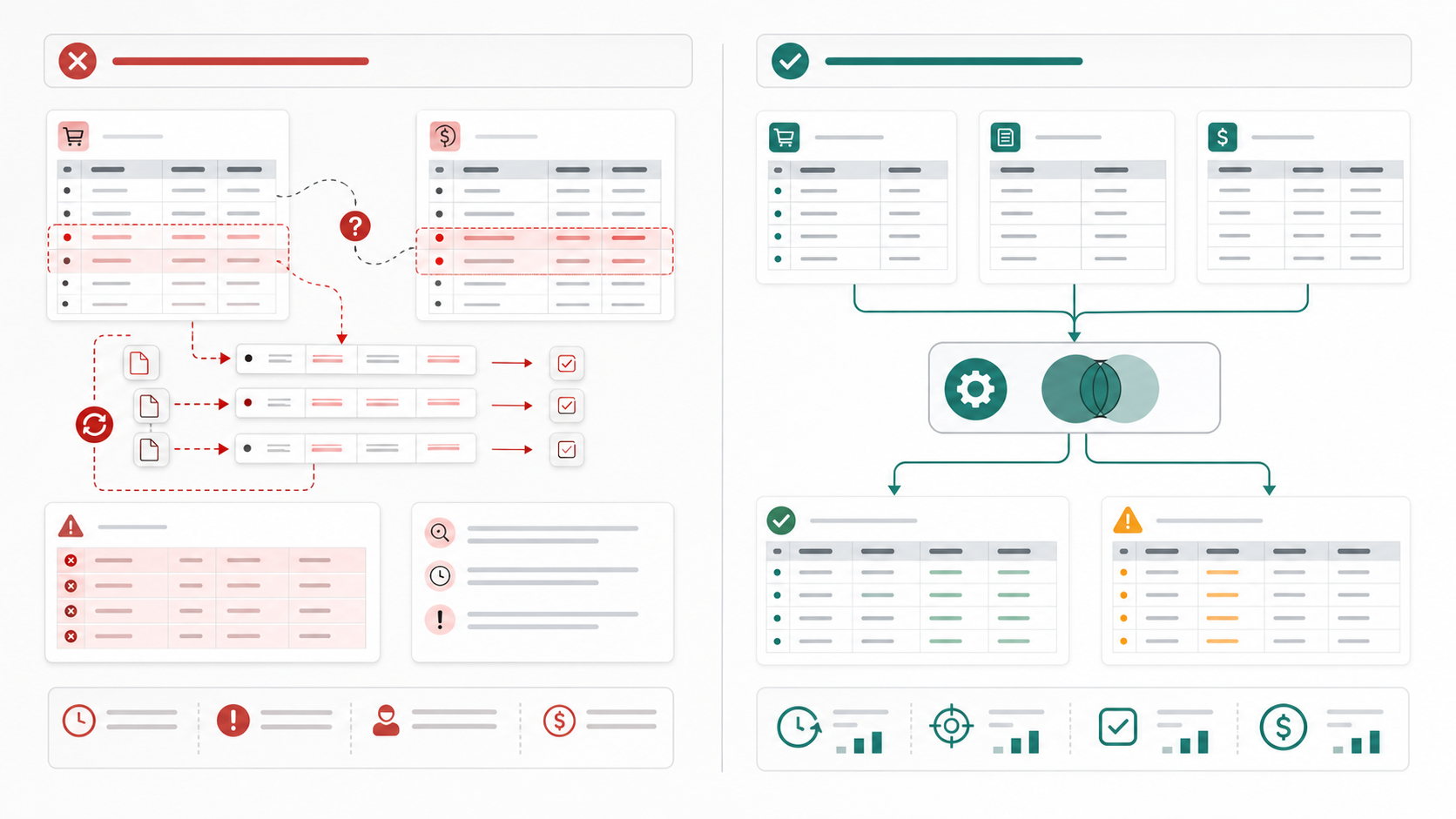
Manual Row Matching vs Join-First Workflow for Marketplace Fee CSV Audits
6/21/2026
Manual Row Matching vs Join-First Workflow for Marketplace Fee CSV Audits
Marketplace fee audits often start with a simple question: do the settlement fees match the orders and the expected fee rules? The trouble starts when reviewers answer that question by manually scanning rows across several exports. It works for a tiny sample, but it becomes fragile as volume grows.
A join-first workflow is usually much more reliable.
The Difference in Approach
| Step | Manual row matching | Join-first workflow |
|---|---|---|
| Data intake | Open files one by one | Import orders, settlements, and fee exports together |
| Matching logic | Reviewer searches visually | Files are joined on a stable transaction key |
| Exception handling | Found late, often during spot checks | Exception rows appear immediately |
| Reuse next period | Limited | Easier to repeat |
| Audit trail | Notes may be scattered | Matching rules stay visible in the workflow |
The key improvement is not just speed. It is consistency.
What Files Usually Need to Be Joined
| Export | Typical key | What it contributes |
|---|---|---|
| Order export | Order ID or transaction ID | Gross sales context |
| Settlement export | Payout line or transaction reference | Actual fee and payout movement |
| Fee detail export | Fee type and amount | Breakdown of charges |
| Refund or adjustment export | Adjustment reference | Explains reversals or credits |
If the keys are standardized early, the audit becomes easier to defend.
Example Joined Audit Table
| Transaction ID | Gross sales | Expected fee | Actual fee | Difference | Status |
|---|---|---|---|---|---|
| TXN-10482 | 182.40 | 27.36 | 27.36 | 0.00 | Matched |
| TXN-10496 | 94.00 | 14.10 | 16.10 | 2.00 | Review surcharge |
| TXN-10503 | 221.70 | 33.26 | 33.26 | 0.00 | Matched |
| TXN-10511 | 63.50 | 9.53 | missing | n/a | Missing settlement row |
Why Manual Matching Breaks Down
| Manual symptom | What it usually means |
|---|---|
| Reviewer keeps re-sorting exports | Matching key is not stable |
| Same transaction gets checked twice | There is no single reconciled table |
| Fee differences are tracked in side notes | Exceptions are not part of the core workflow |
| Review time grows every month | Process design is not scaling with volume |
A Better Join-First Sequence
- Standardize the transaction identifier across all exports.
- Normalize fee-type labels so similar fees are grouped correctly.
- Join the order and settlement data first.
- Join fee details and adjustments second.
- Calculate expected versus actual difference columns.
- Isolate only the unmatched or out-of-tolerance rows for review.
Comparison Table: What the Team Gains
| Need | Manual row matching | Join-first workflow |
|---|---|---|
| High transaction volume | Hard to sustain | More manageable |
| Repeatable month-end process | Weak | Stronger |
| Clear reviewer handoff | Limited | Better |
| Exception documentation | Often separate | Built into final table |
| Spot-check confidence | Moderate | Higher when keys are clean |
Text Chart
Marketplace fee audit quality

Manual rework load            █████████░
Manual exception visibility   █████░░░░░
Join-first repeatability      ██████████
Join-first traceability       █████████░
Join-first exception focus    █████████░
When Manual Matching Is Still Acceptable
There are narrow cases where manual review is fine:
- A one-time check with very low volume.
- A small validation sample before changing the workflow.
- A targeted audit of a known issue affecting only a few transactions.
For recurring settlement reviews, however, a join-first process is usually the safer operating choice.
Checklist for a Join-First Audit
- Clean and standardize transaction IDs before any join.
- Keep fee labels in a mapped category table if names drift across exports.
- Separate missing matches from true fee differences.
- Export the exception rows as a dedicated review list.
Download DataOlllo
If marketplace fee audits still rely on visual row matching across exported files, try a join-first local workflow with DataOlllo: download DataOlllo.