Merge Marketplace Fee Detail CSVs Before a SKU Profitability Review
6/19/2026
Merge Marketplace Fee Detail CSVs Before a SKU Profitability Review
SKU profitability reviews tend to go wrong when revenue is visible but the cost detail is scattered. Sales exports show units and gross revenue, shipping exports show fulfillment charges, advertising files show promotion cost, and marketplace statements add several fee types that do not line up neatly with the product report.
If those files stay separate, margin review becomes guesswork. A better approach is to merge the fee detail locally before anyone decides which SKUs deserve more budget, a price change, or a merchandising reset.
What Needs to Line Up
| File type | Key fields to align | Common problem |
|---|---|---|
| Orders export | SKU, date, units, gross sales | One SKU appears under several naming patterns |
| Marketplace fee file | SKU or listing ID, fee type, posting date | Fees land on a different date grain |
| Shipping charge file | Order ID or shipment ID | One order splits across several packages |
| Promo cost file | SKU, campaign or discount code | Discounts are grouped differently than sales |
The goal is not perfect accounting detail. The goal is a usable operating view of SKU margin.
A Practical Merge Workflow
- Export the order, fee, shipping, and promotion files for the same review period.
- Decide the review grain before merging: order line, SKU-day, or SKU-week.
- Normalize SKU labels and separate bundle SKUs from single-item SKUs.
- Map every fee line into a controlled set of cost buckets.
- Aggregate to the review grain and calculate net contribution margin.
- Filter for the SKUs that moved the most units but generated the weakest margin.
Example Profitability Table
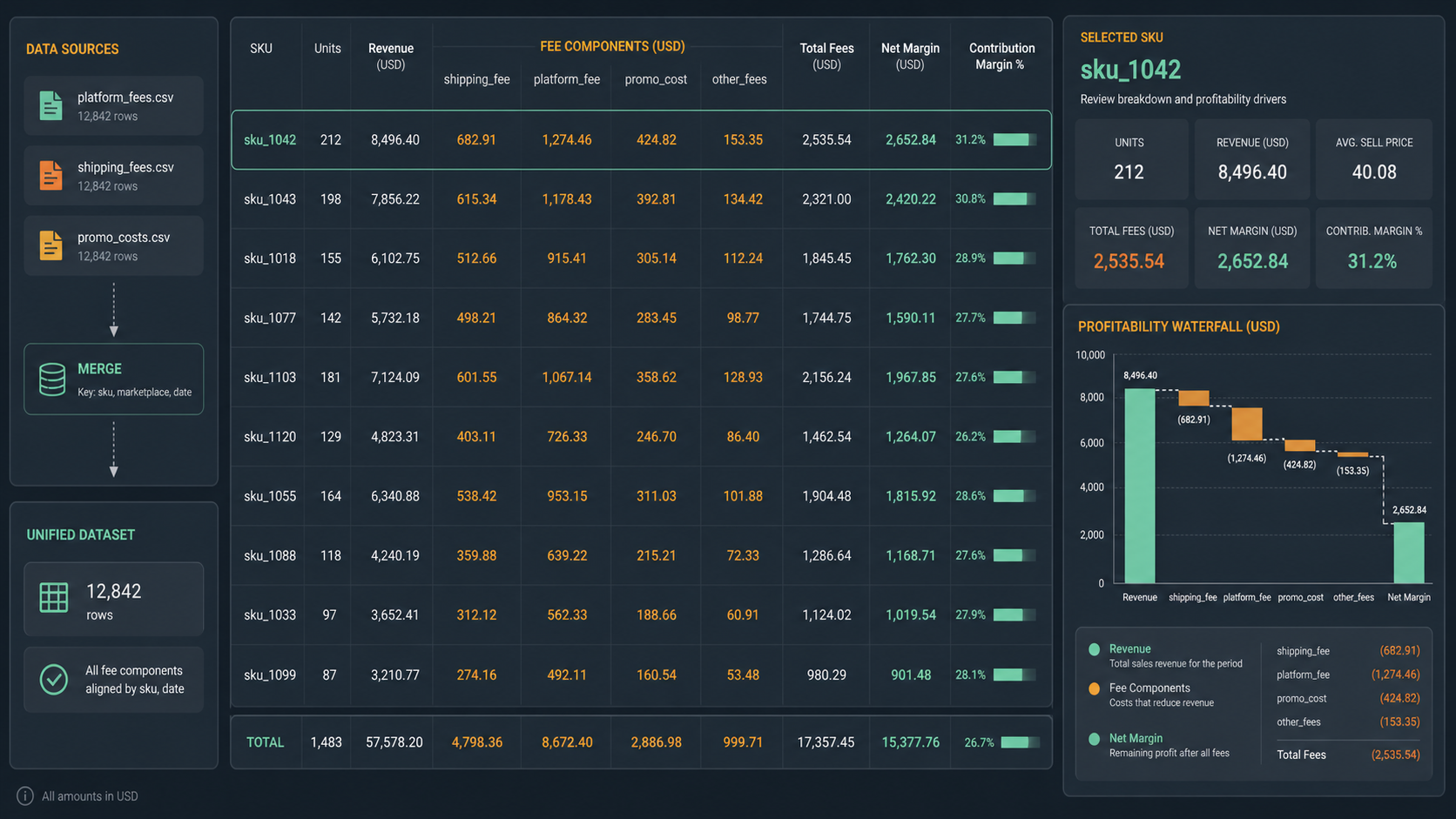
| sku | units | revenue | shipping_fee | platform_fee | promo_cost | other_fees | net_margin |
|---|---|---|---|---|---|---|---|
| sku_1042 | 212 | 8496.40 | 682.91 | 1274.46 | 424.82 | 153.35 | 2652.84 |
| sku_1103 | 181 | 7124.09 | 601.55 | 1067.14 | 358.62 | 128.93 | 1967.85 |
| sku_1088 | 118 | 4240.19 | 359.88 | 639.22 | 215.21 | 72.33 | 1168.71 |
What Reviewers Should Look For
| Signal | What it often means |
|---|---|
| High units but thin net margin | Shipping or fee burden is too high |
| Gross revenue looks healthy but margin falls after fees | Marketplace costs are hidden outside the sales export |
| One SKU swings week to week | Discounting or fulfillment method changed |
| Negative margin after promotions | The item may need a price or assortment decision |
Text Snapshot
SKU profitability review

Sales export collected            ██████████
Fee files aligned                 ████████░░
Cost buckets standardized         ████████░░
Net margin calculated             ███████░░░
Low-margin SKUs isolated          █████████░
Common Mistakes
- Comparing revenue by SKU without attaching fulfillment and platform costs.
- Mixing bundle SKUs into the same view as single-item SKUs.
- Treating advertising cost as a separate marketing question when it changes unit economics directly.
- Reviewing only total margin instead of margin at a practical operating grain.
When This Workflow Helps
This workflow is useful for ecommerce operators, finance analysts, category managers, and marketplace teams that need a fast local profitability review before repricing, promotion planning, or vendor discussions.
It also helps when the business is not ready for a full warehouse model but still needs a better weekly or monthly margin review.
Download DataOlllo
If SKU profitability reviews still depend on disconnected fee files, try a local merge-and-review workflow with DataOlllo: download DataOlllo.