Product Master CSV Compare Before ERP Cutover: A Field-by-Field Checklist
6/19/2026
Product Master CSV Compare Before ERP Cutover: A Field-by-Field Checklist
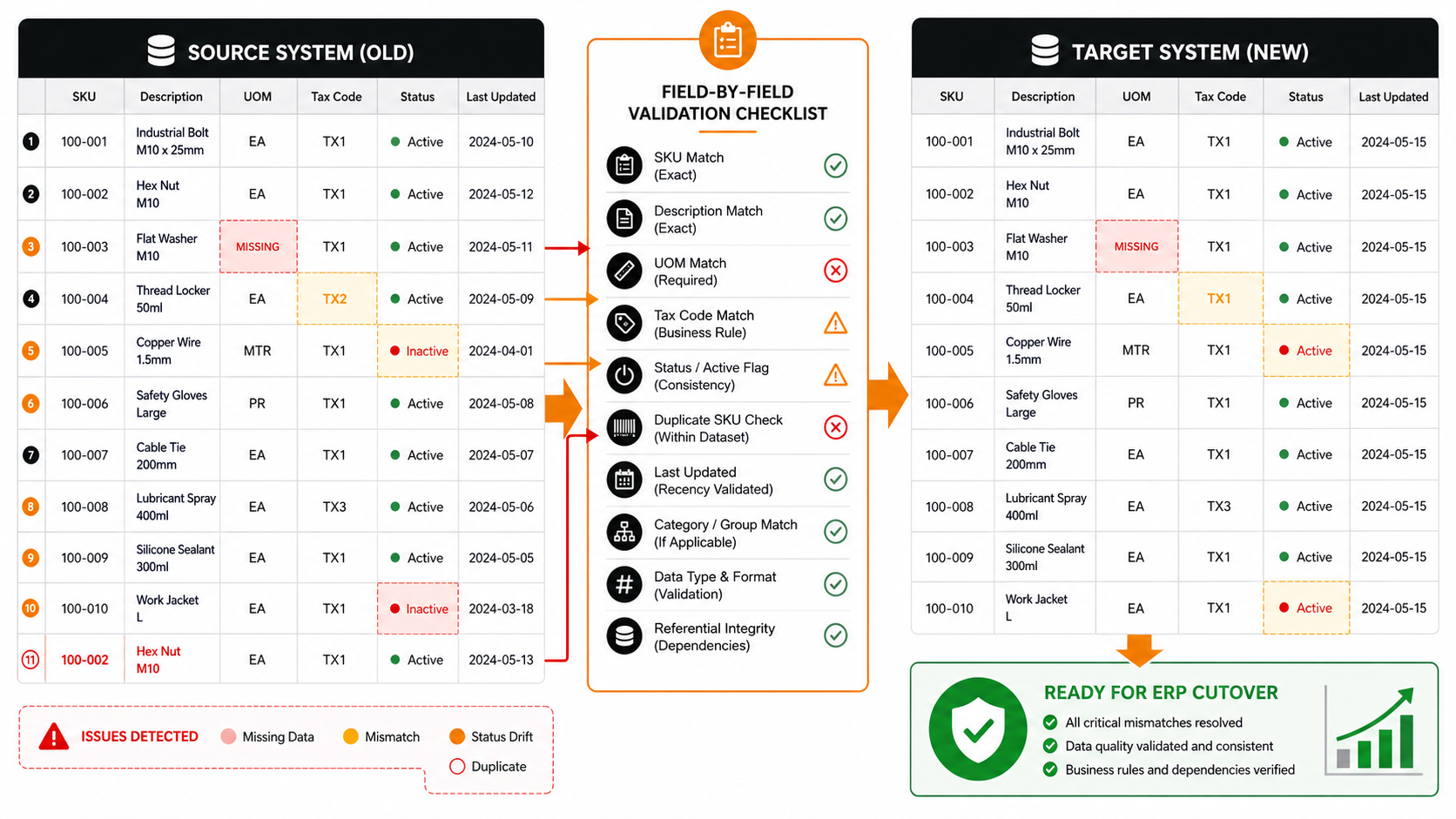
ERP cutover weekends rarely fail because of one dramatic system problem. More often, they fail quietly because the product master moved across systems with small unresolved mismatches: missing units of measure, duplicate SKUs, inactive flags that flipped back to active, or tax codes that no longer match the business rule.
That is why teams should compare the product master CSVs before cutover with a field-by-field checklist instead of relying on spot checks alone.
The Minimum Fields to Compare
| Field | Why it matters | Common drift |
|---|---|---|
| SKU | Primary identifier for joins and reporting | Leading zeros removed or duplicate IDs introduced |
| Description | Used by buyers, planners, and downstream teams | Legacy abbreviations survive in one file only |
| UOM | Controls ordering, stocking, or pricing logic | Missing or inconsistent unit labels |
| Tax code | Affects financial handling | Old code persists in one environment |
| Active status | Determines whether items are operationally available | Inactive items reappear |
| Last updated date | Helps identify stale records | One file reflects an older snapshot |
Recommended Compare Workflow
- Freeze the source and target CSV extracts for the same cutover checkpoint.
- Standardize SKU formatting, whitespace, date format, and null handling.
- Check for duplicates inside each file before comparing across files.
- Compare the mandatory fields row by row.
- Group mismatches by issue type so the owners can fix them quickly.
- Re-run the compare after corrections and preserve the final validation copy.
Example Compare Table
| sku | source_uom | target_uom | source_tax | target_tax | source_status | target_status | review_result |
|---|---|---|---|---|---|---|---|
| 100-001 | EA | EA | TX1 | TX1 | Active | Active | Match |
| 100-003 | Missing | Missing | TX1 | TX1 | Active | Active | UOM issue |
| 100-004 | EA | EA | TX2 | TX1 | Active | Active | Tax mismatch |
| 100-005 | MTR | MTR | TX1 | TX1 | Inactive | Active | Status drift |
| 100-002 | EA | EA | TX1 | TX1 | Active | Active | Duplicate SKU found |
Checklist for Cutover Readiness
| Check | Pass condition |
|---|---|
| Duplicate SKU check | No duplicate identifiers remain in either file |
| Mandatory field completeness | Every required field is populated |
| Business-rule validation | Tax code, active flag, and unit rules are consistent |
| Snapshot recency | Source and target extracts come from the approved checkpoint |
| Final sign-off package | Issue list and corrected compare file are preserved |
Why Spot Checks Are Not Enough
Spot checks usually confirm that the file looks familiar, not that it is safe. A team may review a few rows and still miss the exact records that will trigger pricing errors, planning confusion, or fulfillment problems after cutover.
A structured compare is not about perfection. It is about turning vague cutover risk into a short, fixable list.
Text-Based Readiness View
ERP product master compare

Frozen source and target exports   ██████████
Formats standardized               ████████░░
Duplicate checks completed         ███████░░░
Field mismatches isolated          ████████░░
Cutover-ready validation copy      █████████░
Common Mistakes
- Comparing target data to an outdated source snapshot.
- Ignoring duplicates inside one file because the cross-file compare still looks mostly right.
- Reviewing descriptions but skipping unit and status fields.
- Fixing mismatches without preserving the final validation result.
When to Use This Checklist
Use this workflow before ERP cutover weekends, catalog migrations, distributor onboarding, product data cleanups, and any operational handoff where the item master needs to stay consistent across two systems.
It is particularly helpful when the business needs a reliable compare step without building a custom migration QA tool first.
Download DataOlllo
If product master validation still depends on manual spot checks, try a local field-by-field compare workflow with DataOlllo: download DataOlllo.